Getting started as a manager
Last updated: August 27, 2026
Govflo has no manager role. Administrator, member and approver ship with the product, and none of them is "the person who runs the office". You build the role you need.
Build the role first
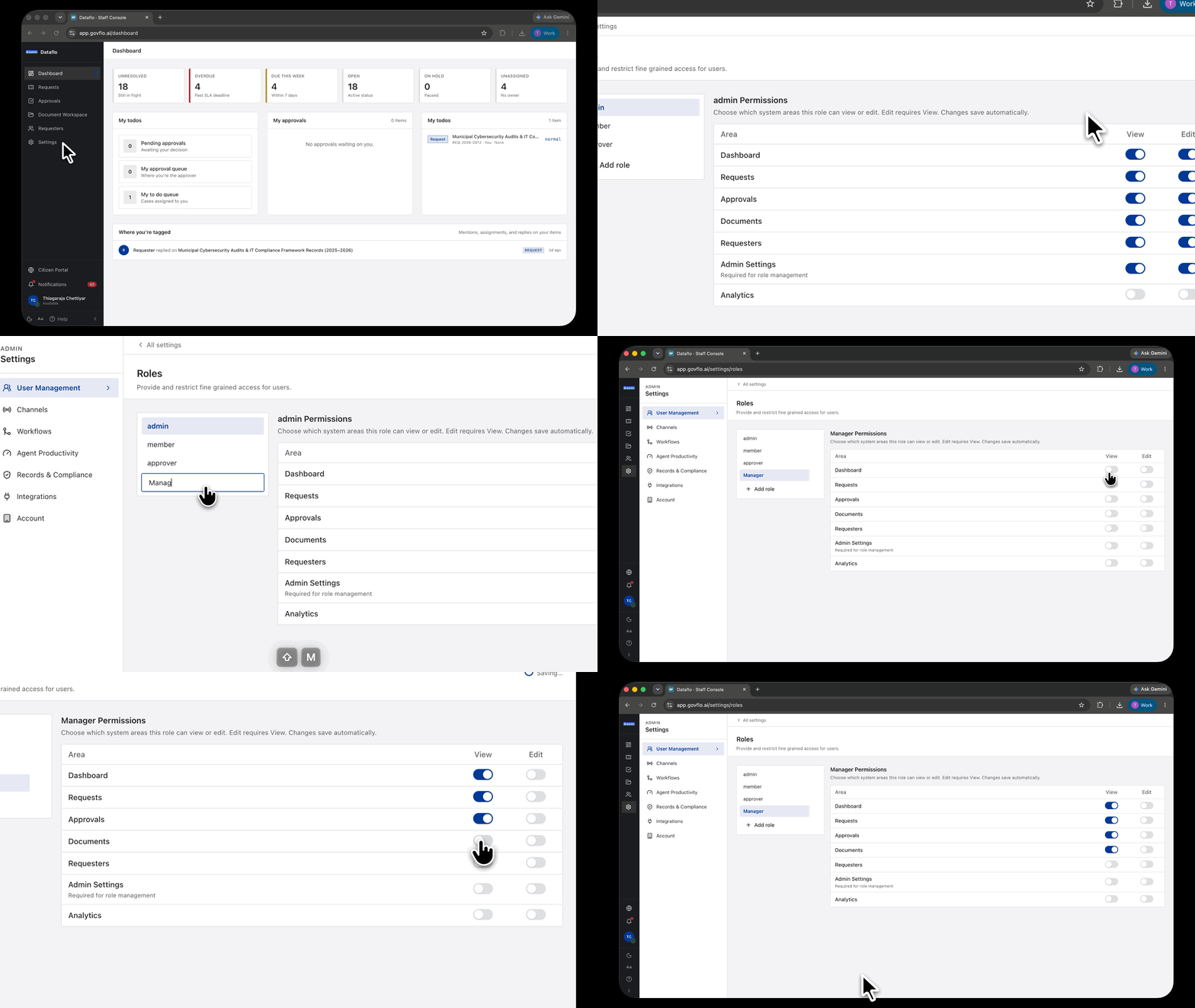
- Go to Settings, then User Management, then Roles.
- Click Add role and name it.
- Set View and Edit per area: Dashboard, Requests, Approvals, Documents, Requesters, Admin Settings and Analytics.
- Assign it to people under Users.
Edit requires View, and changes apply immediately to everyone holding the role.
What a manager usually needs
This is your decision rather than the product's, but the common shape is:
- Dashboard, view. Where the day starts.
- Requests, view and edit. To reassign work and change priority.
- Approvals, view and edit if they sign off, view only if they do not.
- Documents, view. Enough to see where review has got to.
- Requesters, view.
- Admin Settings, off unless they genuinely configure the agency. It grants changes that affect everyone at once.
A manager who only needs to see and not touch is the read-only pattern: View across the working areas, Edit off throughout.
Running the office day to day
Three places tell you almost everything.
The dashboard tiles. Unresolved, Overdue, Due this week, Open, On hold, Unassigned. Watch Unassigned and Overdue daily. Everything else on that row is work somebody is doing; those two are work nobody is doing, on a clock that does not care.
The queue, filtered. Filter by owner to see one person's load, or by SLA to see what is at risk. Filters live in the page address, so any view you build can be bookmarked and sent.
The approvals board. Anything sitting undecided is a release that has stopped.
Reassigning and balancing
Change Assignee on a request, or change Team to move it to a group. Routing to a team applies the team's default assignee, so work does not land unowned.
To move a body of work rather than one request, filter by owner first and send the resulting URL to whoever is picking it up.
What you cannot get
There is no manager dashboard, no workload report and no backlog forecast. What exists is the queue and its filters, which answer most of the same questions if you build the views once and keep them.
If reporting matters to your office, that is the Analytics area, which is gated separately and may not be switched on for your agency.