Email templates and canned responses
Last updated: August 27, 2026
Two screens hold your agency's reusable wording, and they do different jobs. Email templates are what Govflo sends by itself. Canned responses are what an officer chooses to insert.
Email templates
Settings, then Agent Productivity, then Email Templates. This holds the subject and body of every email the system sends. Merge fields are filled in per request at the moment of sending.
How to edit one
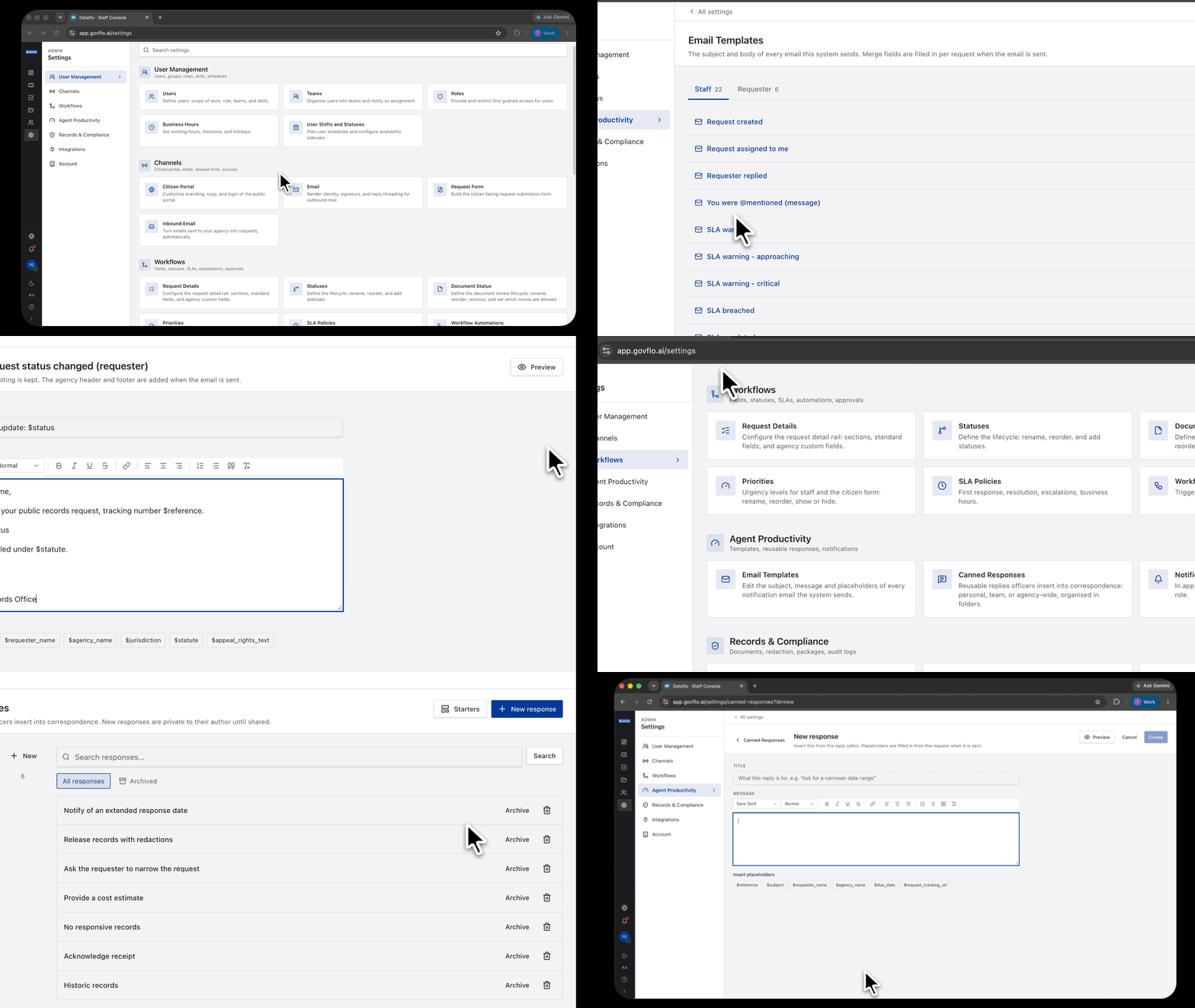
- Choose the audience tab: Staff or Requester.
- Find the template and click Edit.
- Edit the subject and body, keeping the merge fields intact.
- Save. Templates you have changed are marked Customised.
Two audiences, very different stakes
Staff templates are internal notifications: requests created or assigned, requester replies, SLA warnings and breaches, approval requests and decisions, mentions, redaction and discovery outcomes, and automation actions.
Requester templates go to the public. There are six, and they are the voice of your agency: request received, status changed, response deadline extended, agency replied, package ready, and download link expiring.
Rewrite all six before go-live. The defaults are serviceable and generic, and a records office reads generic as impersonal at exactly the moment a requester is deciding whether you are taking them seriously.
The extension letter lives here
Response deadline extended is the letter sent when a deadline is extended. Whether extensions are permitted at all is set per statutory profile under SLA Policies, so check that toggle matches your statute before relying on the template.
Write this one carefully. It is a legal communication about a statutory deadline, and the message most likely to be produced later if the handling of a request is challenged.
Keep merge fields intact
Merge fields are filled in per request. Deleting one produces an email with a hole in it, and the hole is usually the reference number or the deadline, which is the part the requester needed. Edit the words around the fields, not the fields.
Canned responses
Settings, then Agent Productivity, then Canned Responses. These are replies an officer inserts by hand from the reply composer.
Create one with New response, file it into a folder, and save. To use one, open a request, click Insert a canned response in the composer, and pick it.
New responses are private until shared
A response you create belongs to you until it is shared. That lets an officer build their own wording without imposing it on the office, and lets you promote the good ones deliberately. It also means a response a colleague cannot find may simply not have been shared yet.
Starters gives you a working set to adapt rather than an empty list.
Organize into folders early
Group by the moment in the request the wording belongs to: acknowledgement, clarification, extension, partial release, refusal, delivery.
An officer under deadline pressure will not scroll a flat list of forty responses. They will retype the reply, and your consistency is gone.
There is no denial template
The six requester templates do not include a refusal. A denial is written as a canned response rather than an automatic email, which is right: refusing a request is a decision an officer words for the specific case, not something the system should send by itself.
Build your refusal and partial-release wording here, and organize it so it can be found under pressure.
Archive rather than delete
The Archived view keeps replaced wording out of the picker without destroying it. Deleting a response does not change replies already sent, which are part of the correspondence record.