Document management and topics
Last updated: August 21, 2026
Two screens under Records & Compliance control what can be uploaded and how records are classified once they are in.
Document management
Settings, then Records & Compliance, then Document Management.
How to set limits and file types
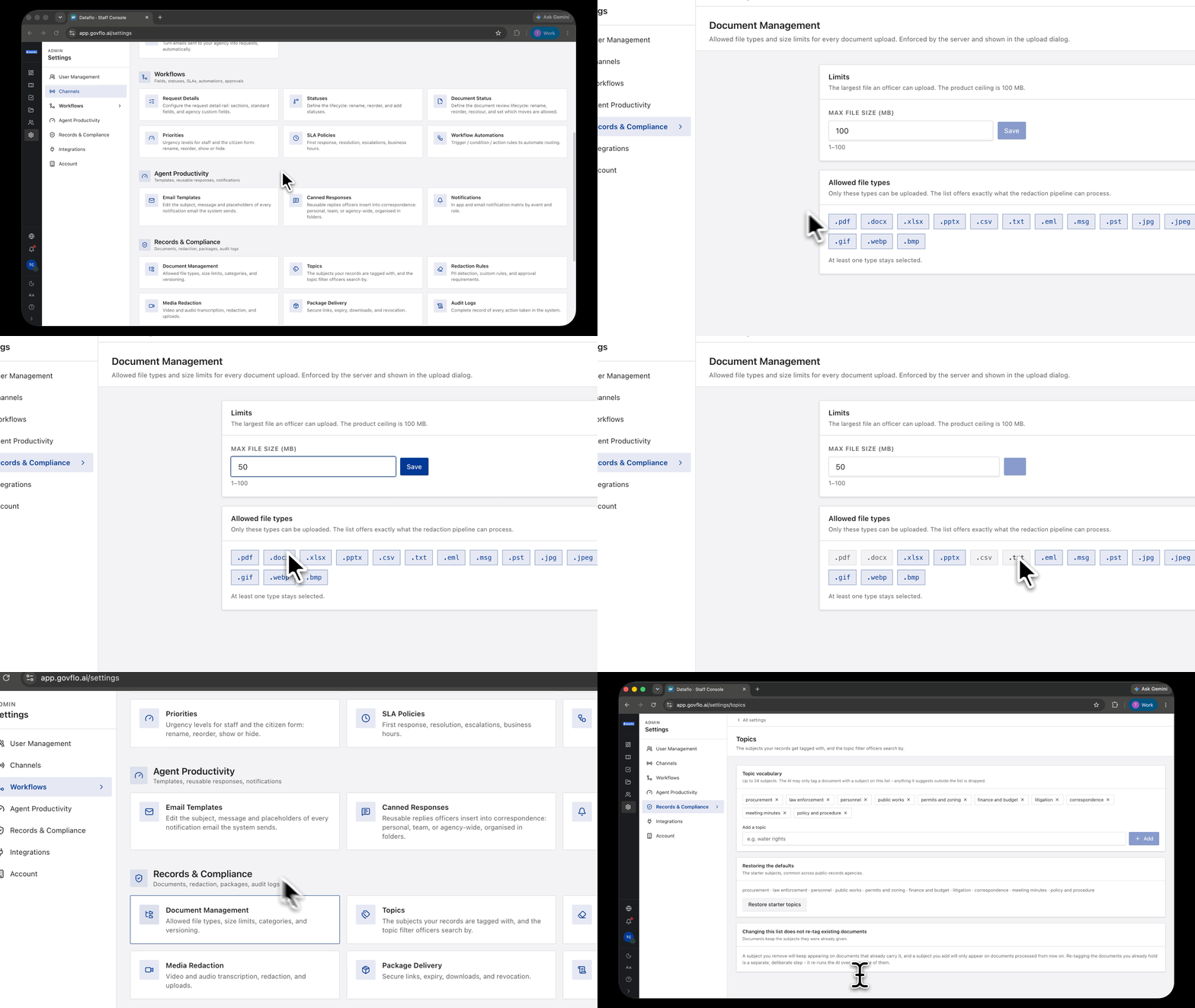
- Set Max file size (MB). The product ceiling is 100 MB.
- Select the allowed file types. At least one must stay selected.
- The settings are enforced by the server and shown in the upload dialog.
The file type list is not arbitrary
The list offers exactly what the redaction pipeline can process: PDF, Office documents, CSV and text, email formats including PST, and common image types.
That is the reason to think before narrowing it. A type you turn off is a type an officer cannot upload at all, which means a responsive record arriving in that format has to be converted by hand before it can enter review.
Narrow the list only where you have a reason, such as an agency policy against a particular format.
Size limits cut both ways
A low limit keeps the workspace tidy and stops someone uploading a video by accident. It also blocks the large PDF that is the actual response to a request.
Set it high enough for your real records rather than for a typical one.
Topics
Settings, then Records & Compliance, then Topics.
Topics are the subjects records get tagged with, and the topic filter officers search by. The vocabulary holds up to 24 subjects, and the starter list covers what most public-records agencies see: procurement, law enforcement, personnel, public works, permits and zoning, finance and budget, litigation, correspondence, meeting minutes, and policy and procedure.
The list is a hard boundary for the AI
This is the important part. The AI may only tag a document with a subject on this list. Anything it suggests outside the list is dropped.
So the vocabulary is not a suggestion, it is the whole set of things a document can ever be tagged with. A subject missing from the list is a subject that will never appear, however clearly a document is about it.
Changing the list does not re-tag anything
Documents keep the subjects they already have. A subject you remove keeps appearing on documents that already carry it, and a subject you add only appears on documents processed from then on.
Re-tagging what you already hold is a separate, deliberate step that re-runs the AI over every document. Get the vocabulary close to right before you start processing volume, because fixing it afterwards is expensive.
Restore starter topics puts the defaults back.