Package delivery settings
Last updated: August 21, 2026
These are the defaults applied to every secure package link sent to a requester. Staff can override them per package, so treat these as the safe starting point rather than a hard rule.
How to set the defaults
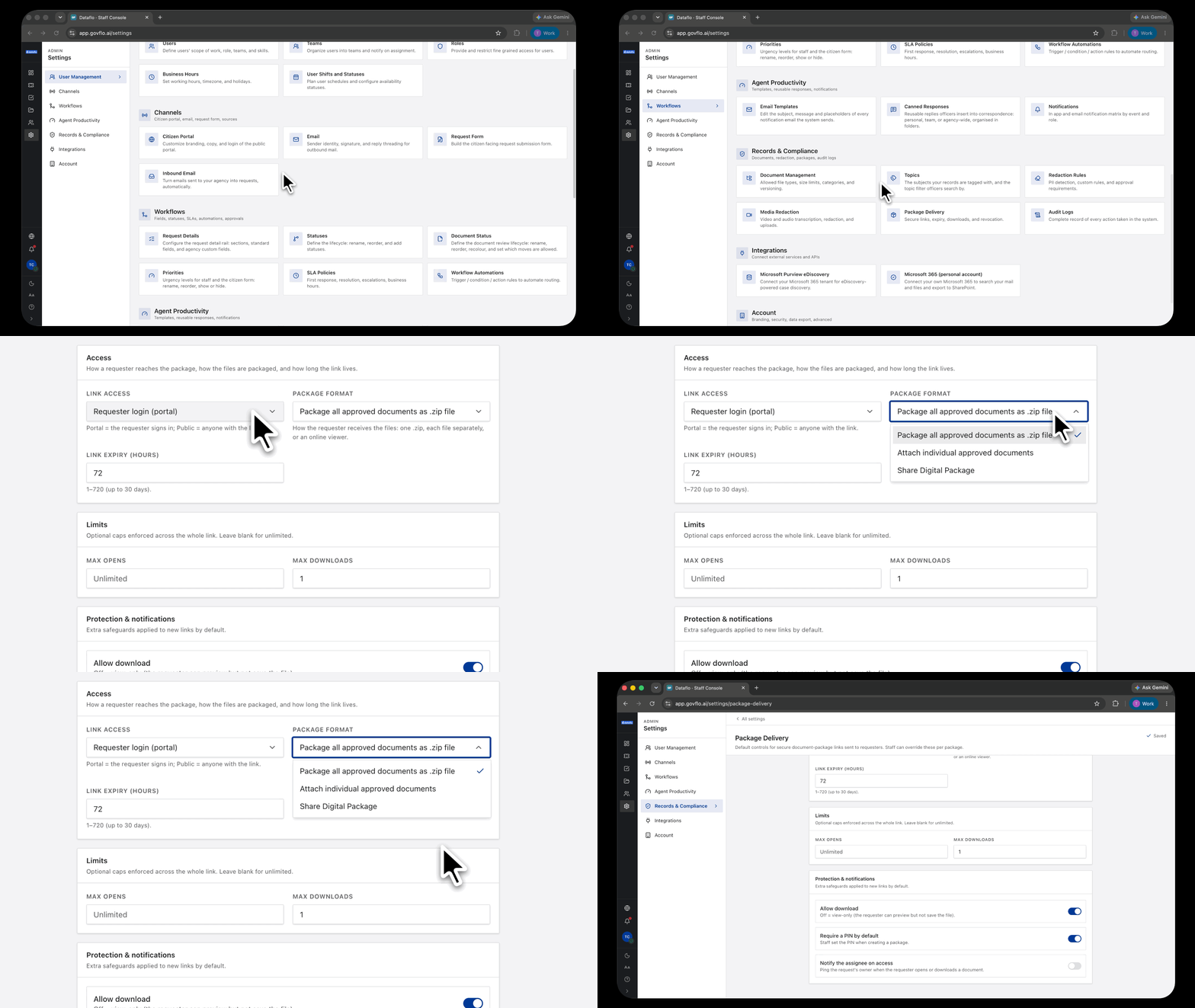
- Go to Settings, then Records & Compliance, then Package Delivery.
- Under Access, set Link access, Package format and Link expiry (hours).
- Under Limits, optionally cap Max opens and Max downloads. Blank means unlimited.
- Under Protection & notifications, set whether downloads are allowed, whether a PIN is required, and whether the assignee is notified on access.
The screen saves as you go.
Link access is the consequential one
Requester login (portal) means the requester signs in to reach the package. Public means anyone with the link can open it.
Public links are convenient and they are also forwardable. A link that reaches a requester's inbox can reach anywhere, and released records with personal information in them are exactly the thing you do not want circulating beyond the person entitled to receive them.
Default to portal login. Use public deliberately, for a specific package, when there is a reason.
Expiry
Between 1 and 720 hours, up to thirty days.
Set it long enough that an ordinary requester will not miss it, and short enough that a link does not sit live forever. A week is a reasonable starting point for most offices.
Whatever you choose, tell the requester the expiry date in the reply that carries the package. A link expiring is not a surprise if they were told when it would.
The limits and safeguards
Max opens and max downloads cap use across the whole link. Useful where a package is sensitive enough that repeated access is itself worth noticing.
Allow download turned off makes the package view-only: the requester can preview but not save. Consider carefully whether that satisfies your obligation to provide records, which in most jurisdictions it may not.
Require a PIN by default means staff set a PIN when creating a package. Sensible for anything with personal information in it, provided you have a way to give the requester the PIN separately from the link.
Notify the assignee on access pings the request's owner when the requester opens or downloads. Worth having on: it tells you the release landed, which is otherwise invisible.
Staff can override every one of these
Each setting is a default. An officer creating a package can change it for that package.
So set these for the common case rather than the most sensitive one. A default that is wrong for most releases gets overridden every time, and a setting people habitually override stops being read.