Redaction rules and PII detection
Last updated: August 27, 2026
This screen configures what Govflo looks for in every document and what it does when it finds it. It sits behind every redaction proposal an officer sees, so it is worth understanding before you change anything.
The screen carries its own caution, and it is accurate: Govflo assists with redaction, final legal decisions remain with your agency, and every redaction is recorded in the audit log.
How to configure detection
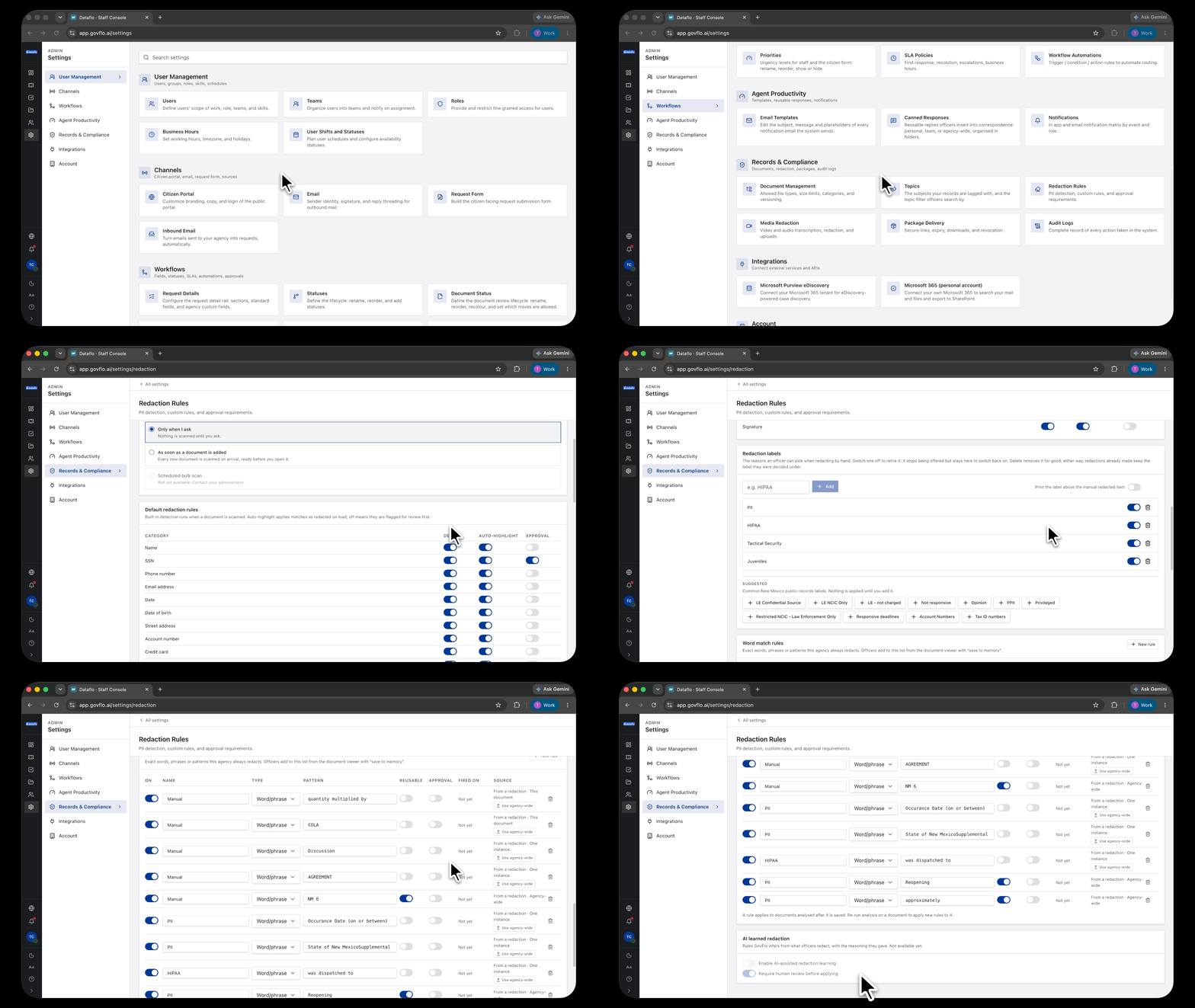
- Go to Settings, then Records & Compliance, then Redaction Rules.
- Under PII scanning, choose when the rules run.
- Under Default redaction rules, set Detect and Auto-highlight per category.
- Under Word match rules, add exact words, phrases or patterns your agency always redacts.
When scanning runs
Two options are available. Only when I ask means nothing is scanned until an officer requests it. As soon as a document is added scans every new document on arrival, so proposals are ready before anyone opens it.
A scheduled bulk scan is listed but not yet available.
Scanning on arrival is the better default for most offices. The work happens before an officer sits down, rather than while they wait.
Detect and auto-highlight are different decisions
Detect decides whether the category is looked for at all. Auto-highlight decides what happens to a match: on, matches are applied as redacted when the document loads; off, they are flagged for review first.
The built-in categories are name, SSN, phone number, email address, date, date of birth, street address, account number, credit card, driver license and signature.
Think about auto-highlight per category rather than setting them all the same. A social security number is almost never releasable, so applying it automatically saves time and risks little. A name frequently is releasable, because public officials acting in their role are named in the records that describe their work. Auto-highlighting names produces over-redaction that an officer then has to undo one at a time.
Word match rules
Exact words, phrases or patterns your agency always redacts. Officers add to this list from the document viewer using save to memory, so the list grows out of real decisions rather than being written up front.
Each rule carries its own scope, showing whether it came from one instance, one document, or was made agency-wide. Use agency-wide promotes a rule to apply everywhere.
That promotion is the mechanism that turns a judgment made by one officer into an agency standard. A decision a senior records officer makes this year keeps being applied after they have left, which is the difference between a tool and an institutional practice.
Rules are not retrospective
A rule applies to documents analyzed after it is saved. To apply a new rule to a document you already hold, re-run analysis on that document.
This catches people out. Adding a rule does not go back and fix documents already reviewed.
AI learned redaction
A section for rules Govflo infers from what officers redact, with the reasoning they gave, plus a switch requiring human review before anything is applied. It is not available yet.