Reading the statutory clock
Last updated: August 27, 2026
Every request carries deadlines your agency is measured against, and they start when the request arrives rather than when you open it. Govflo shows them in the SLA Details panel on the request.
How to read the deadlines on a request
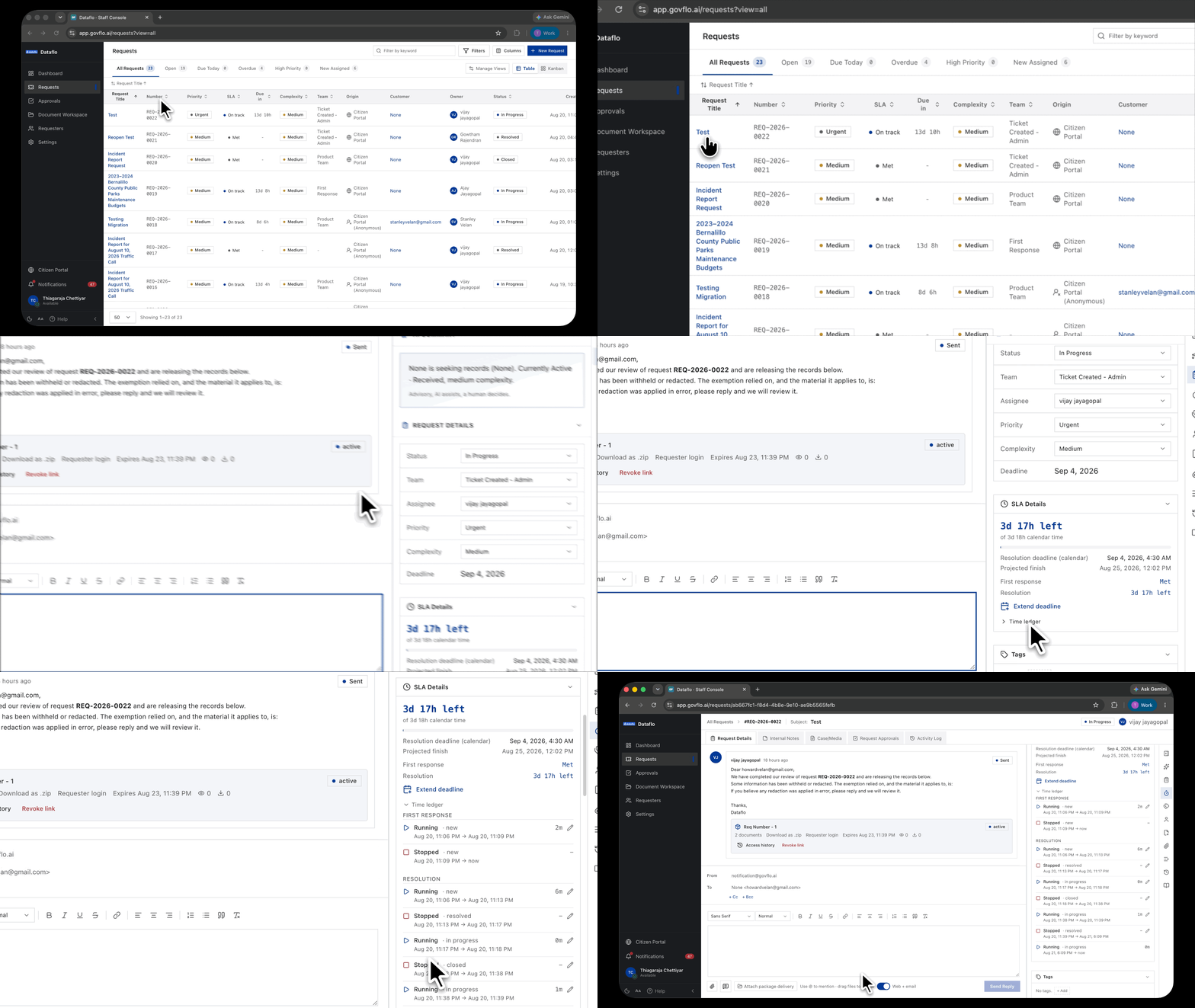
- Open the request.
- Read SLA Details in the right rail. The large figure at the top is the time left on whichever clock is nearer, and the line beneath it says what that clock counts.
- Read First response and Resolution below it for the time left on each.
- Click Time ledger to see every period each clock has spent running or paused.
Two clocks, not one
First response is the time you have to get back to the requester at all. Acknowledging the request, or asking a clarifying question, satisfies it.
Resolution is the time you have to finish: release the records, or refuse them with a reason.
Both start when the request arrives. They run together and expire independently, so your request can sit comfortably inside its resolution window and already be overdue on first response. Replying early costs a sentence and removes one of the two ways to breach.
The panel states the unit each clock counts, for example First response deadline (calendar). Read that label rather than assuming, because your two windows may use different units.
The due date and the time used are different things
The due date is a calendar date. It is what you and the requester are told.
Time used is a stopwatch. It counts only while the clock is running, and the Time ledger lists each period with the status the request was in and when that period started and ended.
You have missed a deadline when time used passes the allowed window, not simply when the date arrives. On any request you have paused the two figures will disagree, and both are right.
What pauses, and what never does
Every status carries an SLA setting of either running or paused, configured by your agency under Settings, then Workflows, then Statuses. In the starter configuration Awaiting Requester Response and Awaiting Payment are paused, because the delay is not the agency's.
The agency default does not pause. Under statutes written like New Mexico's IPRA, the legal window does not stop because you are waiting on somebody. If you move a request to a pending status and the Time ledger still shows a clock counting, that is the law working as intended rather than a tracking fault.
Move the request to a pending status anyway, because the record should show why it is waiting. Just do not treat it as protection from the deadline.
How a due date moves
Here is the same request in three situations. It reaches you on 2 March with a 15 calendar-day window.
| Situation | What happens | Due |
|---|---|---|
| Nothing interrupts | The created date plus the allowed window. | 17 March |
| Paused for 7 days | The due date moves later by exactly the paused time, so the agency keeps its full window. | 24 March |
| Extended by 3 business days | An extension adds time on top of the original window, counted in business days. | 20 March |
A pause shifts your window. An extension enlarges it. They are different acts with different consequences, and only one of them is available to you on a statutory clock.
What the queue is telling you
The SLA column on the request list gives you the state at a glance: On track, At risk, Overdue, or Met. A request whose countdown has stopped shows no figure, with a tooltip confirming the clock has stopped. The Due in column shows the time left on the nearer of the two clocks.