Creating and managing a saved view
Last updated: August 21, 2026
A view is a filter combination you have saved and named. It appears as a tab above the request table, so a queue you rebuild every morning becomes one click instead. Views are worth creating for the questions you ask repeatedly: my open work, everything overdue, one team's requests.
How to create a view
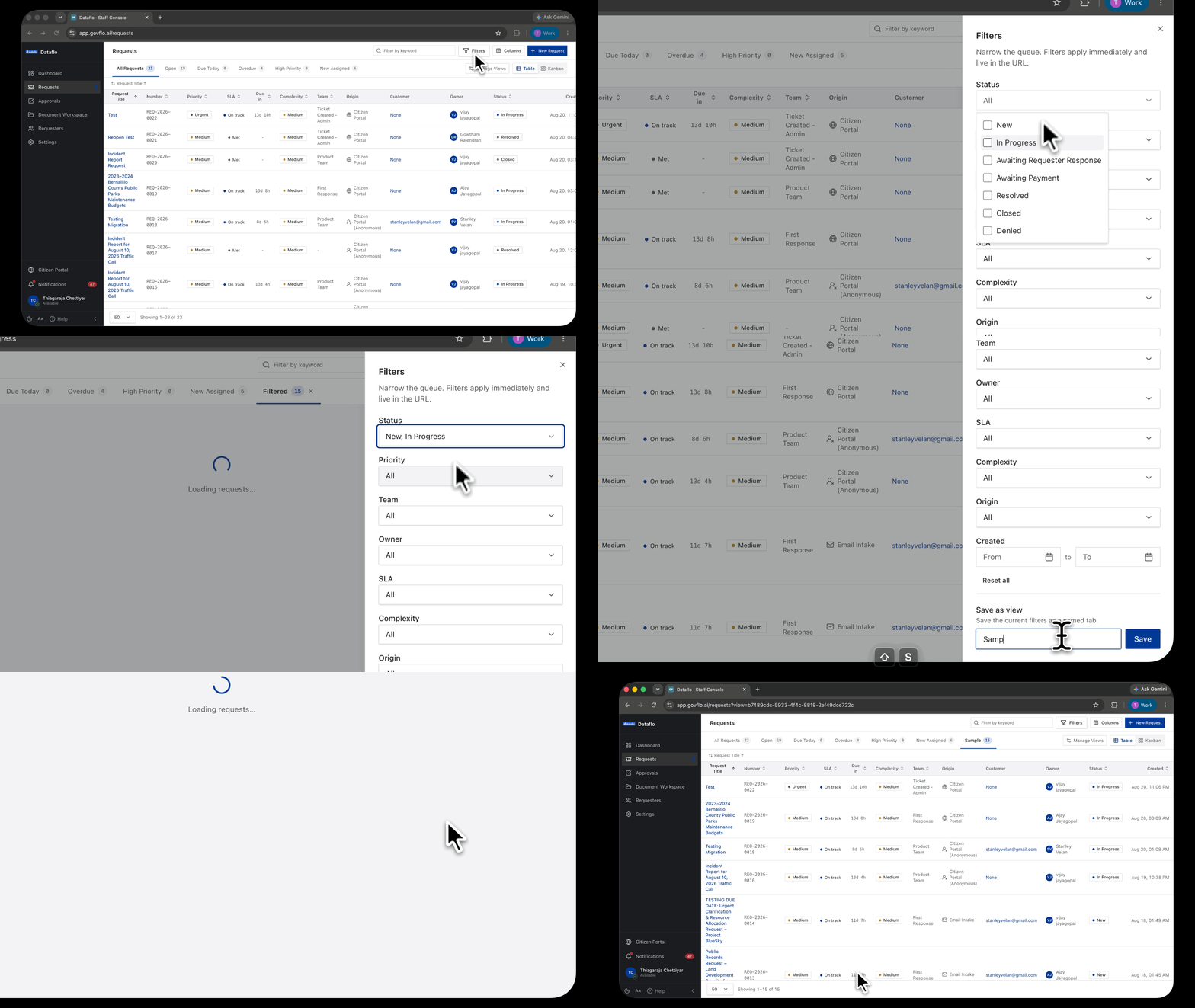
- Go to Requests.
- Click Filters and set the filters you want the view to hold.
- Check the queue behind the panel looks right. What you see now is what the view will save.
- Scroll to the bottom of the Filters panel, to Save as view.
- Type a name into View name. Name it after the question it answers, not the filters it contains. "Overdue, my team" beats "Status + SLA + Team".
- Click Save.
The view appears as a new tab beside All Requests, with a count next to it.
Sharing a view with your team
A saved view belongs to the person who made it. To give a colleague the same queue, send them the URL instead: your filters live in the address bar, so the link reproduces the queue exactly. They can then save it as their own view.
This is also the fastest way to hand over work. A link to "everything assigned to me, still open" is a better handover note than a list of reference numbers.
Managing views you already have
Manage Views sits above the table on the right. Use it to rename a view whose name no longer describes it, or remove one you have stopped using.
Removing a view does not affect any request. A view is only a saved question, so deleting it changes nothing about the work itself.
When a view is worth it, and when it is not
Create a view when you will ask the same question every day. My open requests, everything at risk this week, one team's queue.
Do not create one for a question you will ask once. Filter, copy the URL, and move on. A tab bar with fifteen views on it is harder to use than no views at all, because you end up reading the tabs instead of the work.